
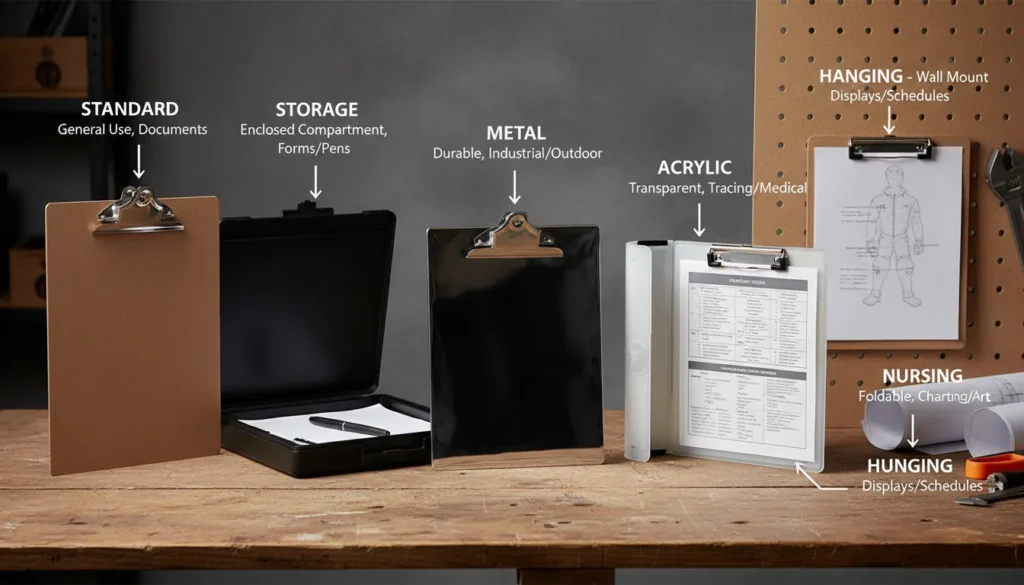
A clipboard is one of those quiet tools that “just works” until it doesn’t—your paper slides, your form smears in the rain, or you realize you needed a storage compartment five minutes ago. I’ve used clipboards everywhere from shop floors to event check-ins, and the right choice can make work faster, cleaner, and more professional. This guide breaks down clipboard types, materials, and best uses—plus a quick, practical section on digital clipboards (the copy/paste kind) since that’s what many people mean when they search “where is my clipboard?”

What Is a Clipboard (and why it still matters)
A clipboard is a flat writing surface with a spring clip that holds paper in place for writing or organizing on the go. It’s a productivity tool: it stabilizes documents, prevents lost pages, and creates a portable “mini-desk” in warehouses, hospitals, classrooms, construction sites, and pop-up retail. In practice, the clipboard you choose affects durability, legibility, hygiene, and even compliance (think patient privacy or jobsite documentation).
Common situations where clipboards solve real problems:
- Capturing signatures at a counter or event
- Taking notes while standing or walking a site
- Protecting forms from weather, dust, or grease
- Keeping checklists organized and visible
Clipboard Types (pick by workflow, not by looks)
Different clipboard designs exist because workflows vary. Here are the most useful categories I see in professional settings.
1) Standard clipboards
The classic single-board style is light, affordable, and easy to replace. It’s best when you’re mostly stationary and don’t need document protection.
Best for:
- Classrooms
- Front desks
- Light inventory counting
2) Storage clipboards (a.k.a. box clipboards)
These have an internal compartment for forms, pens, and small tools. If you’ve ever watched pages blow away in a parking lot, you’ll appreciate these.
Best for:
- Field inspections
- Route drivers
- Events and registration teams
3) Aluminum/metal clipboards
Metal clipboards are rigid and durable. They handle heavy use well and can double as a stable writing surface even with thick multi-part forms.
Best for:
- Construction sites
- Manufacturing floors
- Maintenance crews
4) Plastic clipboards
Plastic offers a balance: lightweight, often weather-resistant, and easy to clean. Many healthcare and food-service teams prefer plastic because it wipes down quickly.
Best for:
- Clinics and hospitals
- Kitchens and back-of-house ops
- Mobile teams in mixed environments
5) Specialty clipboards (nursing, calculator, foldable, hanging)
Specialized designs reduce friction:
- Nursing clipboards often include quick-reference guides and storage
- Calculator clipboards speed up counting and pricing tasks
- Hanging clipboards are built for racks, hooks, and visible workflow stations
Clipboard Materials: pros, cons, and how they feel in real use
Materials change more than durability—they change writing comfort, weight, and resilience to water, chemicals, and impact.
The most common materials
- Hardboard/MDF: affordable, decent rigidity; can swell if soaked
- Plastic (PP, PVC, ABS): easy to clean; varies in stiffness by thickness
- Aluminum: strong and rigid; may feel cold; can dent under extreme impact
- Acrylic: sleek and display-friendly; can scratch; more common for signage/display clipboards
Quick comparison table (most buyers can decide from this)
| Material | Key Advantages | Common Drawbacks | Best Uses |
|---|---|---|---|
| Hardboard | Low cost, good writing feel | Not great in rain, edges can wear | Classrooms, offices, short-term use |
| Plastic | Washable, often water-resistant, lightweight | Can flex if thin, cheaper clips may fail | Healthcare, hospitality, mobile teams |
| Aluminum | Very rigid, long-lasting, handles heavy use | Dents, can feel slippery without texture | Job sites, warehouses, maintenance |
| Acrylic | Modern look, great for display | Scratches, not ideal for rough handling | Menus, events, front-of-house displays |
How to Choose the Right Clipboard (a practical checklist)
When I’m buying clipboards for a team, I don’t start with color—I start with constraints. Use these filters to land on the right option quickly.
- Environment
- Indoors and dry: hardboard is often enough
- Wet/dusty/oily: plastic or aluminum wins
- Document security
- If privacy matters (medical, HR, contracts), choose storage or a clip with a cover
- Writing comfort
- If staff writes all day, prioritize stiffness and smooth edges
- Form factor
- Letter vs A4 vs legal size
- Portrait vs landscape
- Clip strength
- Strong clip for multi-part forms; gentler clip for single sheets you swap often
Best Uses by Scenario (real-world picks)
To make this actionable, here’s a scenario-based recommendation list.
- Construction & field work: aluminum clipboard or storage clipboard for wind, dirt, and rugged handling
- Healthcare: easy-clean plastic clipboard; consider a storage model for privacy and supplies
- Warehouses & inventory: metal clipboard or hanging clipboard for stations and count sheets
- Schools & training: hardboard for budget + comfort; plastic for younger grades (easy cleaning)
- Events & check-in: storage clipboard keeps forms flat and prevents “page drift”

Custom Clipboards: branding, labeling, and maker-friendly upgrades
A clipboard is also a mini billboard—especially for small businesses, clinics, and service teams. I’ve found that a simple logo, job number system, or color-coded label reduces misplacement and makes processes feel more “buttoned up.”
Common customization options:
- UV printing for logos and durable labels
- Laser engraving (best on coated metal, some plastics, and wood finishes)
- Vinyl decals for quick, low-cost labeling
- Accessory add-ons: pen loops, document corners, barcode/QR stickers
If you’re customizing at scale, digital fabrication tools can help keep results consistent. For example, makers and small businesses using laser engraving often prefer predictable settings and clean edges; tools in the xTool ecosystem (hardware plus xTool Studio software) are designed for repeatable production workflows on materials like metal tags, acrylic labels, and wood branding plates. If you’re exploring that world, xTool’s overview of laser engraving is a solid starting point, and their lineup of laser cutters helps when you move from labeling to making jigs, templates, or packaging.

Digital Clipboard vs. Physical Clipboard (don’t mix them up)
Search engines see “clipboard” used two ways:
- Physical clipboard: the board with a clip for paper
- Digital clipboard: temporary memory where copied text/images are stored for paste
If you’re here because copy/paste is missing, the next section is for you.
Where can I find my clipboard? (Windows, macOS, Android, iPhone)
Digital clipboards are usually not a folder you browse like files. They’re a temporary storage area. Some systems offer clipboard history, which lets you view items you copied earlier.
Windows 10/11: view clipboard history
- Go to Settings > System > Clipboard.
- Turn on Clipboard history.
- Press Windows key + V to view and paste previous items.
Microsoft’s guide on Clipboard in Windows explains the feature and shortcuts.
macOS: clipboard basics (and history via tools)
macOS has a single-item clipboard by default (copy one thing, it replaces the last). You can paste with Command + V, but history typically requires a clipboard manager. Apple’s keyboard shortcuts reference is useful if you’re troubleshooting copy/paste behavior.
Android: access clipboard (varies by keyboard)
Many Android devices show clipboard entries inside the keyboard app.
- Gboard: open the keyboard, tap the clipboard icon (if available), and enable it if prompted
Google’s help pages for Gboard cover clipboard features by version and device.
iPhone/iPad (iOS/iPadOS): limited clipboard visibility
iOS uses a system clipboard without a built-in history view. You can paste with Paste or Command + V on a connected keyboard, but historical entries generally require third-party apps (with privacy considerations).
How to find something you saved on clipboard (and why it disappears)
If you copied something and can’t find it, one of these is usually true:
- You copied something else afterward (single-item clipboard got overwritten)
- The device restarted (clipboard cleared)
- Clipboard history is off (Windows)
- The app you’re pasting into blocks certain paste types (security policies)
Quick troubleshooting checklist:
- Copy the item again, then paste into a plain text app first (Notepad/Notes).
- Enable clipboard history (if available).
- Try a different app to confirm it’s not app-specific.
Care and Maintenance (small steps that extend clipboard life)
Most clipboard failures are clip-related, not board-related. In field environments, dust and grit can weaken springs or make clamps slip.
- Clean metal clips with a dry brush or compressed air (avoid soaking springs)
- For plastic boards, use mild soap; avoid harsh solvents unless the plastic is rated for them
- Replace low-quality clips if the board is still good (common in shop systems)
FAQ: Clipboards (physical + digital)
1) What are the main types of clipboards?
Standard, storage/box, metal/aluminum, plastic, and specialty models like nursing or hanging clipboards.
2) Which clipboard material is best for outdoor use?
Plastic or aluminum. Plastic is lighter and easy to clean; aluminum is more rigid and durable.
3) Where can I find my clipboard on Windows?
Turn on Settings > System > Clipboard > Clipboard history, then press Windows + V to see previous items.
4) How do I access previous clipboards?
On Windows, use clipboard history. On macOS and iOS, you typically need a clipboard manager app for history.
5) Where is your clipboard stored?
Digitally, it’s stored in system memory (temporarily). Physically, it’s a board you carry—often stored at workstations, nurse stations, or in vehicles.
6) Can I laser engrave a clipboard?
Yes—especially metal clipboards (engraving the surface coating) and some plastics/acrylic. Test settings first to avoid melting or uneven marks.
7) What size clipboard should I buy?
Match your most common paper: Letter/A4 for general use, Legal for long forms, and consider landscape if you use wide checklists.
Top 5 Best Storage Clipboards in 2020
Conclusion: Choose the clipboard that matches the job
A clipboard looks simple, but the right one prevents lost paperwork, speeds up routines, and holds up under real conditions. If your day involves weather, motion, or privacy needs, upgrade from a basic board to plastic, aluminum, or a storage clipboard—and consider labeling or engraving so it doesn’t “walk away.” If you meant the digital clipboard, enabling history (especially on Windows) is the fastest path to finding what you copied.