
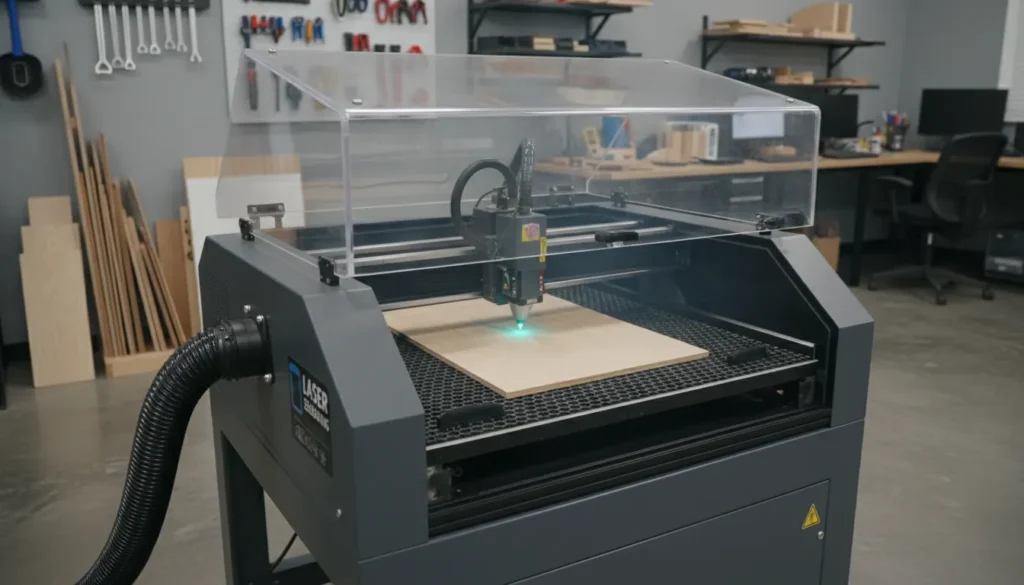
If you’ve ever watched a CNC laser trace a design and thought, “That looks easy,” you’re not wrong—but the results depend on a few choices that aren’t obvious at first. The machine doesn’t just “burn a line.” It balances power, speed, focus, material type, and airflow so your edges come out crisp instead of charred. I’ve run jobs that looked perfect in software but failed on the bed because of one missed setting (usually focus or air assist). This guide breaks down what a CNC laser is, what it can realistically do, and how to pick the right setup for your shop.

What Is a CNC Laser (and Why People Use One)?
A CNC laser is a computer-controlled system that directs a laser beam to cut, engrave, or mark materials with high precision. “CNC” refers to the motion control (X/Y, sometimes Z and rotary), while the laser type (diode, CO₂, fiber, UV) determines what materials you can process and how cleanly. Compared with rotary tools, lasers are non-contact, so you avoid tool wear and many workholding headaches. That’s why makers, small businesses, and production shops lean on CNC laser cutting and engraving for repeatable results.
Common reasons to choose a CNC laser:
- Speed for 2D work (signage, labels, panels, stencils)
- Fine detail (small text, line art, photo engraving)
- Low per-part cost once settings are dialed in
- Easy personalization (names, serials, QR codes)
For a deeper decision framework, see xTool’s guide on CNC vs. Laser Cutter Which Is Right for You?.
CNC Laser Types (Diode vs CO₂ vs Fiber vs UV)
Not all “CNC laser” machines behave the same. The laser source changes the wavelength, absorption, and typical applications. In practice, this is the biggest factor in whether your job is effortless or frustrating.
Diode lasers (typically 5W–40W+ optical)
Diodes are popular for entry-level CNC laser engraving and light cutting. They’re great for wood, leather, some coated metals (marking), and painted surfaces. I like diodes for quick prototyping and craft production, but they can struggle with clear acrylic and thick cuts without perfect setup.
Best for:
- Wood engraving/cutting (thin to moderate)
- Leather, paper, cardboard (with careful fire safety)
- Marking coated metals (anodized aluminum, painted steel)
CO₂ lasers (commonly 40W–150W+)
CO₂ is the “workhorse” for multi-material cutting in many small businesses. It excels at acrylic, wood, and many organics, often with cleaner edges and faster throughput than diode. If your product line includes acrylic signs, ornaments, or packaging inserts, CO₂ is often the most forgiving choice.
Best for:
- Acrylic cutting (clear, colored, frosted)
- Wood, MDF, plywood (with proper exhaust)
- Rubber stamps, fabrics (material-dependent)
If you’re comparing CO₂ options with automation in mind, xTool’s xtool p3 the flagship 80w co2 laser cutter is a useful reference point for what “production-friendly” features look like.
Fiber lasers (commonly 20W–200W+ for marking; kW for cutting)
Fiber is the standard for metal marking and many metal cutting systems. It’s the right tool for stainless, aluminum, brass, and titanium marking—fast, permanent, and crisp. For deep engraving or industrial cutting, power levels and machine class change significantly.
Best for:
- Metal marking (serials, logos, QR codes)
- Some plastics (with correct settings)
- Production identification and traceability
UV lasers (ultra-fine marking)
UV is ideal when you need minimal heat impact and very fine detail, like on plastics, glass, or coated materials. It’s used for premium engraving where edge quality and micro-detail matter more than raw cutting thickness.
Best for:
- Fine marking on plastics and coated surfaces
- Glass marking (often with excellent detail)
- Low-heat applications
What Can a CNC Laser Cut or Engrave?
A CNC laser can generally do three categories of work: cut, engrave, and mark. The difference matters because it affects power requirements and expectations.
- Cutting: beam goes through the material (e.g., 3mm acrylic letters).
- Engraving: removes material depth (e.g., wood inlay pockets, 3D-ish texture).
- Marking: changes surface color/finish without much depth (e.g., anodized aluminum).
Materials you’ll commonly see:
- Wood & plywood: versatile, but glue layers can affect cut quality.
- Acrylic: CO₂ shines; diode struggles on clear acrylic.
- Leather: engraves well; cutting requires ventilation and testing.
- Metal: typically fiber (best), sometimes UV; diode often needs coatings for visible marks.
For metal-focused buying guidance, this xTool resource on Metal Laser Engraving Machines is a strong starting point.
| Laser Type | Best Materials | Typical Use (Cut/Engrave/Mark) | Strengths | Limitations | Ideal User |
|---|---|---|---|---|---|
| Diode | Wood, leather, paper, some plastics; coated/anodized metals (marking) | Engrave/Light Cut | Low cost, compact, easy to run, good for hobby engraving | Slow cutting; limited power; struggles with clear/white acrylic and bare metals | Hobbyists, makers, small craft shops |
| CO2 | Wood, acrylic, leather, paper, rubber, glass/stone (engrave) | Cut/Engrave | Excellent non-metal cutting (especially acrylic); clean edges; common sizes/powers | Cannot cut/mark bare metals without additives; larger footprint; optics alignment/maintenance | Sign makers, fabrication shops, education labs |
| Fiber | Metals (steel, aluminum, brass), some plastics; anodized/painted surfaces | Mark/Engrave | Fast, high-contrast metal marking; low maintenance; long source life | Poor for wood/acrylic cutting; higher upfront cost; smaller work areas typical | Machine shops, product/serial marking, jewelry/industrial users |
| UV | Plastics (ABS, PC, PVC), glass, ceramics, coated metals, silicon wafers | Mark/Engrave | “Cold” processing—minimal heat damage; very fine detail; great for sensitive materials | Expensive; lower cutting capability/thickness; more complex service requirements | Electronics/medical device marking, high-precision manufacturers |
The 7 Specs That Matter When Choosing a CNC Laser
Most buyers over-index on wattage. Power matters, but it’s only one part of consistent results. Here’s what I check first when evaluating a CNC laser for real work.
-
Laser type (wavelength)
This determines material compatibility more than anything else. -
Optical power + stability
Stable output gives repeatable cuts across long jobs. -
Spot size & beam quality
Smaller spot = finer detail and narrower kerf. -
Work area & pass-through options
If you sell signs or panels, bed size becomes a growth limiter fast. -
Air assist & exhaust design
Air assist improves edge quality and reduces flare-ups; exhaust protects optics and your lungs. -
Autofocus / Z control
Misfocus is one of the top causes of “why is it suddenly not cutting?” -
Software workflow
Look for reliable camera alignment, material libraries, and predictable job control.
If you’re shopping specifically for the “best CNC laser cutter” category, this overview can help narrow options: Best CNC Laser Cutter: A Comprehensive Guide.
Setup That Actually Improves Results (Without Buying a New Machine)
A CNC laser can look “underpowered” when the real issue is setup. These changes routinely produce the biggest quality jump per dollar.
-
Dial focus every time (especially after changing material thickness).
I’ve had “mystery failures” disappear instantly after refocusing—same file, same power. -
Use proper air assist for cutting.
It clears smoke from the kerf and cools the cut zone, improving edge clarity. -
Upgrade your workholding (pins, magnets, jigs, honeycomb/knife bed).
Flat stock stays flat; cut geometry stays accurate. -
Control fumes with a sealed path and filtration/venting.
Cleaner optics = consistent power delivery. -
Run a material test grid before production.
A 5-minute test saves hours of scrap.

Common CNC Laser Problems (and Fast Fixes)
Most issues come down to energy density (focus), heat management (speed/power), or contamination (smoke on lens).
-
Not cutting through
- Increase power or reduce speed
- Check focus height
- Clean lens and mirrors (CO₂)
- Improve air assist and exhaust
-
Excessive charring on wood
- Increase speed and use more passes
- Use masking tape
- Increase air assist
- Consider different plywood (glue matters)
-
Melted acrylic edges
- Increase speed, reduce power
- Ensure strong air assist
- Use cast acrylic for cleaner results
-
Inconsistent engraving depth
- Confirm material is flat
- Tighten belts/rails, check motion system
- Verify power stability and cooling
Get the MOST POWER out of your Laser by doing THIS in Lightburn!
CNC Laser vs CNC Router: Which One Fits Your Work?
A CNC router removes material with a spinning bit. A CNC laser uses heat and light. That difference changes everything: edge finish, dust vs fumes, 3D capability, and material range.
Choose a CNC laser if you:
- Do mostly 2D cutting/engraving
- Need fine detail and fast personalization
- Want minimal mechanical force on parts
Choose a CNC router if you:
- Need 3D carving or thick material removal
- Work heavily with hardwood slabs, foam, or machining plastics
- Want crisp pockets and joinery without burn marks
Many shops end up with both: laser for speed + personalization, router for thickness + 3D. If you want a practical breakdown, revisit CNC vs. Laser Cutter Which Is Right for You?.
Where xTool Fits in a CNC Laser Workflow
xTool’s ecosystem is designed around taking an idea from design to production—especially for creators and small businesses who need reliability, safety accessories, and an easy learning curve. In real workflows, that matters as much as raw specs, because uptime and repeatability are what make a CNC laser profitable. I’ve found that teams scale faster when the machine, software, materials, and safety gear are designed to work together instead of being pieced together from five vendors.
If your roadmap includes multi-material cutting, automation, and production features, exploring xTool’s CO₂ lineup (like the P-series) is a logical next step. For metal fabrication and beyond engraving—welding, cleaning, and shop-ready workflows—xTool’s broader portfolio is also worth considering depending on your applications.

Conclusion: A CNC Laser Is Only “Easy” After You Pick the Right One
A CNC laser can be the fastest path from idea to sellable product—if the laser type matches your materials and your setup supports clean, repeatable jobs. When I see new users struggle, it’s rarely because they “didn’t buy enough watts.” It’s usually focus, airflow, fumes, or choosing a laser source that doesn’t love the material. Start with your top 3 materials, pick the right laser class, then lock in process basics like air assist, exhaust, and test grids.
FAQ About CNC Laser
1. What does “CNC laser” mean?
It means a laser cutting/engraving system controlled by CNC motion—computer-driven, repeatable positioning for cutting, engraving, or marking.
2. Is a CNC laser good for beginners?
Yes, especially for 2D projects. The learning curve is mostly materials + settings + safety, not complex machining.
3. What’s the best CNC laser for acrylic?
In most cases, a CO₂ laser is best for cutting acrylic cleanly, especially clear acrylic.
4. Can a CNC laser engrave metal?
Yes—fiber lasers are the standard for metal marking and engraving. UV can also mark certain metals/coatings; diode often needs coatings for visible marks.
5. How do I stop burn marks on wood with a CNC laser?
Use air assist, increase speed, use masking, and consider multiple passes. Also test different plywood types because glue layers vary.
6. Do I need an enclosure and exhaust for a CNC laser?
Strongly recommended. Enclosures improve safety and consistency; exhaust protects your health and keeps optics cleaner.
7. What file types work with CNC laser software?
Most workflows use SVG, DXF, AI/PDF (import), and raster images (PNG/JPG) for photo engraving—exact support depends on the software.